
How to change appearance: character creator, mid-game changes, pawn looks, new hairstyles and tattoos.
How to Change Appearance (Arisen & Pawn)
You can change your appearance at any point after reaching Vernworth: quick touch-ups at the barberie cost gold, while a full rebuild of your Arisen or Main Pawn needs a single-use Art of Metamorphosis costing 500 Rift Crystals. The Dark Arisen expansion adds new hairstyles and tattoos to those same menus, and armor looks are handled by a separate transmog system.
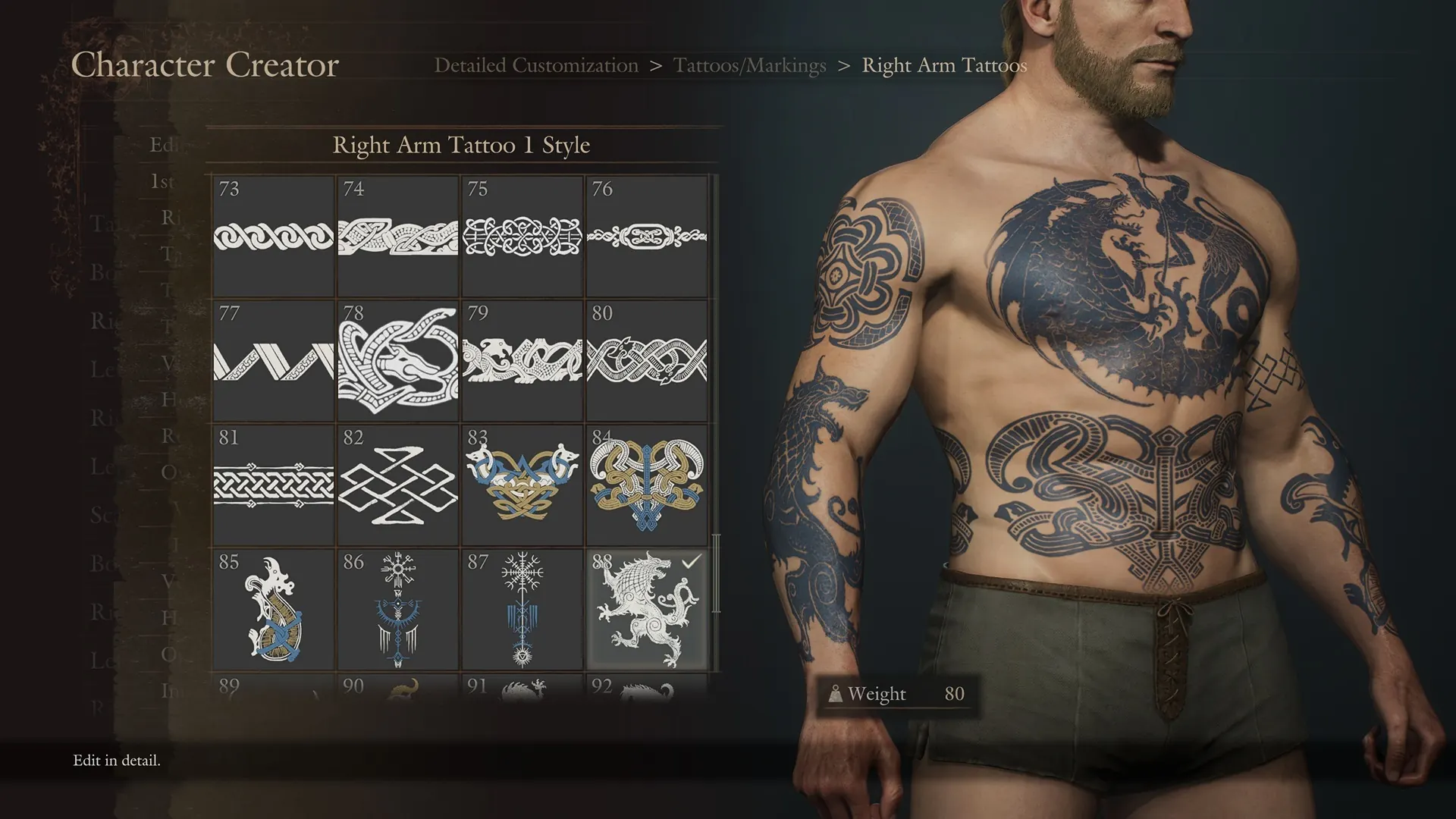
How to Change Appearance: All Methods at a Glance
| Goal | Method | Cost | Where |
|---|---|---|---|
| New hairstyle, makeup, or markings only | Barberie visit | 10,000 gold per category (media-reported) | Clovis's Barberie in Vernworth; Mettefere's Cosmetics in Bakbattahl |
| Full Arisen re-edit (face, body, everything) | Art of Metamorphosis, then barberie | 500 Rift Crystals per single-use book | Rift merchant at the Vernworth Pawn Guild; more copies at other major settlements |
| Full Main Pawn re-edit | Same book, choose the pawn when using it | 500 Rift Crystals per book (one book per character) | Same vendors; use the book at any barberie |
| New Dark Arisen hairstyles and tattoos | Updated creator options (expansion owners) | No extra fee beyond the expansion | Character Creator & Storage app and in-game barberie menus |
| Change gear looks without touching stats | Transmog (Tailor Equipment via Hal) | Side-quest unlock, Norgan gear only | Norgandian Settlement after Reaching the Far Shore |
Touch Up Hair, Makeup, and Tattoos at the Barberie
If you only want a new hairstyle, different makeup, or fresh markings, you do not need any special item. Visit a barberie in a major city: Clovis's Barberie sits in the northwest corner of Vernworth, and Mettefere's Cosmetics serves Bakbattahl. Talk to the stylist and pick the category you want to redo.
Media guides agree on the price: each category (hair and facial hair, makeup, markings such as tattoos and scars) costs 10,000 gold per change. IGN additionally lists a 25,000-gold all-in-one option covering the surface-level categories in one visit. These prices sting early on, when the same gold could buy weapons and armor, so most players live with their launch look until the mid game.
The hard limit matters more than the price: barberie visits only cover surface details. Height, weight, body type, and bone structure are untouched. For anything structural, you need the book described below.
Official source: Character Creator & Storage confirms the standalone creator app was updated with the Dark Arisen hairstyles and tattoos, so the new options flow into the same in-game menus.
Get a Full Re-Edit With the Art of Metamorphosis
The Art of Metamorphosis is a single-use tome that reopens the full character creator mid game. Fextralife describes it plainly: one use only, and it edits either your own appearance or a pawn's. That means a complete redo — face, body proportions, and everything the barberie cannot reach.
Buy it from the Rift merchant at the Pawn Guild in Vernworth for 500 Rift Crystals. Multiple outlets (Beebom, Siliconera, Fextralife, IGN) agree on both the vendor and the 500 RC price, which makes this one of the best-verified facts on this page. Vernworth's stock is limited, so if the shelf is empty, check the pawn guild vendors at other major settlements such as Bakbattahl for more copies.
How to use it, step by step:
- Buy at least one Art of Metamorphosis (one per character you plan to redo).
- Walk into any barberie and talk to the stylist.
- Pick the Modify Appearance option and choose whether the book applies to your Arisen or your Main Pawn.
- The full creator opens. Rebuild freely, then confirm — the book is consumed.
Stocking Rift Crystals is the only real grind here. Game8 lists the standard sources: defeating monsters, opening treasure chests, completing side quests, and sharing your Main Pawn with other players. The 4.0 update also raised forgotten riftstone payouts from 30 to 90 RC, which helps. No real-money purchase is required for any of this; the in-game RC route covers everything.
A single Art of Metamorphosis covers either your Arisen or your Main Pawn, never both. Buy two books before sitting down if you plan to restyle the whole duo.
How to Change Your Main Pawn's Appearance
Your Main Pawn follows the same system with one extra stop. The pawn guild NPC standing by the Grand Riftstone of Vermund in Vernworth handles Main Pawn services: buy the Art of Metamorphosis from him, then spend it at a barberie exactly as above, selecting your pawn when prompted. Game8 notes the result is effectively a full character-creation redo for the pawn.
For everything about running your pawn beyond looks — inclinations, the new Orienteer specialization, and the Explore and High Five commands — see the Pawn Guide: Inclinations, Orienteer & Commands. If your question is actually about the name floating above your pawn's head rather than its face, that is a different system explained in What Is a Moniker in Dragon's Dogma 2.
New Hairstyles and Tattoos in Dark Arisen
As of the Dark Arisen launch (2026-10-10), the expansion widens the creator pool for both Arisen and Main Pawn. Community reports put the additions at roughly 20 new hairstyles and 31 new tattoos, first spotted when the free Character Creator & Storage demo updated ahead of release. Treat those exact counts as community-reported until Capcom publishes an official tally.
What is officially confirmed: Capcom's Dragon's Dogma account and the demo page both state the Character Creator & Storage app now includes the new hairstyles and tattoos, lets you store up to 5 Arisen and 5 Main Pawns, and is built for preparing characters for the game. If you own the expansion, the new options appear in the in-game barberie and creator flows as well, so old saves can adopt the new looks without restarting.
Practical advice: build candidates in the free app first, where experimenting costs nothing, then commit the winner in game with gold or a book.
Gear Looks Are Separate: Transmog vs Body Appearance
Changing your face and changing your armor's look are two unrelated systems, and mixing them up wastes a trip. Everything above edits bodies. Armor and weapon looks belong to transmog: after completing the Reaching the Far Shore side quest (take the treatise to Hal in the Norgandian Settlement), Hal's Tailor Equipment option reskins gear while keeping its stats. Capcom's official wording limits this to weapons and armor obtained in Norgan, so base-game gear keeps its fixed look for now. The full quest chain is covered in How to Unlock Transmog in Dark Arisen.
Cosmetic armor from outside the game follows its own rules too. The Pre-Order Bonus: Norgan Fashion Set Guide explains how the Northern Attire set is claimed from inn storage, which is worth knowing before you spend a book trying to recreate that look on your body.
FAQ
Can I change appearance for free? Surface changes always cost gold (10,000 per category at the barberie) and full re-edits cost 500 RC per book. Nothing here requires real money, and experimenting in the free Character Creator & Storage app costs nothing at all.
Does body size affect gameplay, or is it pure looks? Mostly looks, but not entirely. Beebom notes that character proportions tie into practical traits such as stamina regeneration behavior, so if your launch build feels sluggish, a Metamorphosis rebuild can fix the body as well as the face.
Can I edit a hired support pawn? No. The book covers your Arisen and your Main Pawn only. Support pawns belong to other players and travel home unchanged.
Do I need Dark Arisen for the new hairstyles and tattoos? Yes, as far as official posts indicate: the new options arrived with the expansion and its creator-app update. The base-game pool is unchanged.
I used my book and picked the wrong character. Can I undo it? There is no undo; the book is consumed on use. This is the one place where the game's triple-slot save system earns its keep — rest at an inn before big edits so the Last Inn Rest save holds your pre-makeover state. General save hygiene is covered in the save backup guide.
Related
More Dragon's Dogma 2: Dark Arisen Guides
Dark Arisen price & editions: $29.99 DLC vs $49.99 bundle, Switch 2 bundle-only, what to buy.
Dark Arisen review roundup: Metacritic score, Steam rating, critic verdicts and is it worth it?
Dragonsplague explained: symptoms, combat buffs, Dragonsbaulk Draught cure and keep-or-cure strategy.
Eternal Ferrystone guide: how to get it from Brant, how to use fast travel with Portcrystals.
Hard Mode guide: how to enable, difficulty changes, old saves, and whether to start fresh or NG+.
How to start the Dark Arisen DLC: Brant location, night requirement, level 40/20 guide and quest fixes.
How to unlock transmog in Dark Arisen: Reaching the Far Shore quest, Hal location and Relic gear limits.
Is Dark Arisen worth it? Content volume, playtime, price analysis and buy or wait verdict by player type.